How to create pagination using javascript with page numbers?
Pagination is a common method in web development for breaking down large amounts of data into smaller segments, making content easier to navigate and improving the user experience. In this tutorial, we will teach you how to create pagination using Javascript and Bootstrap. By the end, you will be able to easily implement pagination to dynamically display articles, photos, and other content on your website.
Why Use Pagination in Web Development?
Pagination plays a crucial role in web development, especially when dealing with a large amount of content. Whether you are building a blog, a news website, or a product catalog, pagination offers the following benefits:
- Improved Performance: Loading only a small portion of content at a time allows pages to load faster, providing customers with a smooth and positive experience.
- Better User Experience: Pagination simplifies navigation and makes it easier for users to find the content they might be looking for.
- Reduced Server Load: With the help of pagination, you can reduce the number of database queries by retrieving data only for the current page.
Basic Structure of JavaScript Pagination
To implement JavaScript pagination, we will use HTML, CSS, and JavaScript. The goal is to divide the dataset into separate pages and display one page at a time.
Step-by-Step Guide JavaScript Pagination
HTML Structure
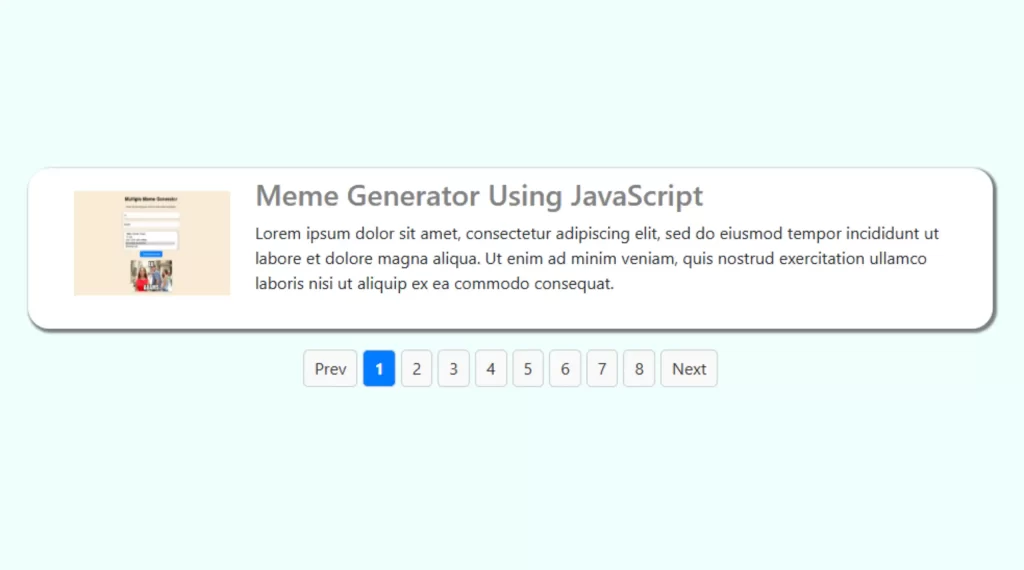
We begin by creating a basic HTML structure for our pagination. We will use a container to hold the paginated content, a pagination bar with “Previous” and “Next” buttons, and buttons for individual page numbers.
					 <div class="mt-5 row newz-row justify-content-center">
                <div  class="col-lg-8 mt-5">
                    <ul>
                        <li><img decoding="async" src="https://codingtutorials.in/wp-content/uploads/2025/01/mems-1024x570.webp" class="imgrespons"></li>
                        <li>
                            <div class="container">
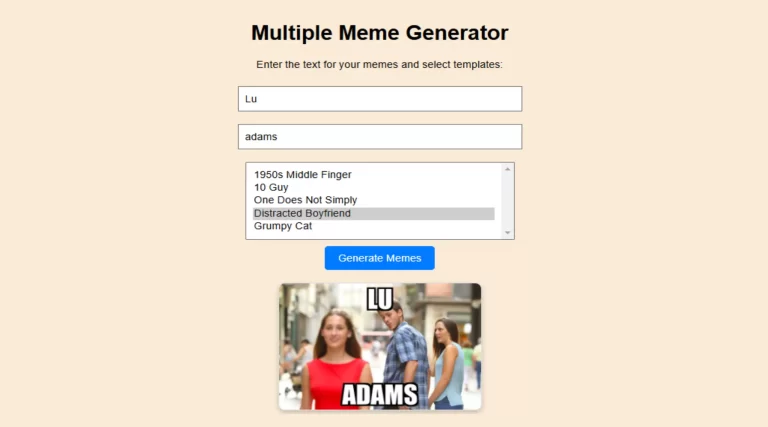
                                <h3 class="pt-2"><a href="https://codingtutorials.in/how-to-create-multiple-meme-generator-using-javascript/"style="text-decoration: none;color: grey">Meme Generator Using JavaScript</a></h3>
                                <p>Lorem ipsum dolor sit amet, consectetur adipiscing elit, sed do eiusmod tempor incididunt ut labore et dolore magna aliqua. Ut enim ad minim veniam, quis nostrud exercitation ullamco laboris nisi ut aliquip ex ea commodo consequat.</p>
                            </div>
                        </li>
                    </ul>

                </div>
             </div>

            <div  class="row newz-row justify-content-center">
                <div  class="col-lg-8 mt-5">
                    <ul>
                        <li><img decoding="async" src="https://codingtutorials.in/wp-content/uploads/2025/01/photoshop-design.webp" class="imgrespons"></li>
                        <li>
                            <div class="container">
                                <h3 class="pt-2"><a href="https://codingtutorials.in/how-to-create-photoshop-design-in-javascript/"style="text-decoration: none;color: grey">Photoshop Design in JavaScript</a></h3>
                                <p>Lorem ipsum dolor sit amet, consectetur adipiscing elit, sed do eiusmod tempor incididunt ut labore et dolore magna aliqua. Ut enim ad minim veniam, quis nostrud exercitation ullamco laboris nisi ut aliquip ex ea commodo consequat.</p>
                            </div>
                        </li>
                    </ul>

                </div>
             </div>


            <div  class="row newz-row justify-content-center">
                <div  class="col-lg-8 mt-5">
                    <ul>
                        <li><img decoding="async" src="https://codingtutorials.in/wp-content/uploads/2025/01/javascript-clock-1024x512.webp" class="imgrespons"></li>
                        <li>
                            <div class="container">
                                <h3 class="pt-2"><a href="https://codingtutorials.in/how-to-create-an-amazing-wall-clock-in-javascript-and-html/"style="text-decoration: none;color: grey">Wall Clock in JavaScript</a></h3>
                                <p>Lorem ipsum dolor sit amet, consectetur adipiscing elit, sed do eiusmod tempor incididunt ut labore et dolore magna aliqua. Ut enim ad minim veniam, quis nostrud exercitation ullamco laboris nisi ut aliquip ex ea commodo consequat.</p>
                            </div>
                        </li>
                    </ul>

                </div>
             </div>

            <div  class="row newz-row justify-content-center">
                <div  class="col-lg-8 mt-5">
                    <ul>
                        <li><img decoding="async" src="https://codingtutorials.in/wp-content/uploads/2025/01/word-count-1024x570.webp" class="imgrespons"></li>
                        <li>
                            <div class="container">
                                <h3 class="pt-2"><a href="https://codingtutorials.in/how-to-make-word-and-character-count-using-javascript/"style="text-decoration: none;color: grey">word and character count</a></h3>
                                <p>Lorem ipsum dolor sit amet, consectetur adipiscing elit, sed do eiusmod tempor incididunt ut labore et dolore magna aliqua. Ut enim ad minim veniam, quis nostrud exercitation ullamco laboris nisi ut aliquip ex ea commodo consequat.</p>
                            </div>
                        </li>
                    </ul>

                </div>
             </div>

            <div  class="row newz-row justify-content-center">
                <div  class="col-lg-8 mt-5">
                    <ul>
                        <li><img decoding="async" src="https://codingtutorials.in/wp-content/uploads/2024/12/Dynamic-QR-Code-1024x576.webp" class="imgrespons"></li>
                        <li>
                            <div class="container">
                                <h3 class="pt-2"><a href="https://codingtutorials.in/dynamically-generating-a-qr-code-using-php/"style="text-decoration: none;color: grey">QR code using PHP</a></h3>
                                <p>Lorem ipsum dolor sit amet, consectetur adipiscing elit, sed do eiusmod tempor incididunt ut labore et dolore magna aliqua. Ut enim ad minim veniam, quis nostrud exercitation ullamco laboris nisi ut aliquip ex ea commodo consequat.</p>
                            </div>
                        </li>
                    </ul>

                </div>
             </div>

            <div  class="row newz-row justify-content-center">
                <div  class="col-lg-8 mt-5">
                    <ul>
                        <li><img decoding="async" src="https://codingtutorials.in/wp-content/uploads/2024/12/lightbox-gallery-768x432.webp" class="imgrespons"></li>
                        <li>
                            <div class="container">
                                <h3 class="pt-2"><a href="https://codingtutorials.in/how-to-create-a-dynamic-image-lightbox-gallery-using-html-and-css/"style="text-decoration: none;color: grey">Create a dynamic image lightbox gallery in HTML</a></h3>
                                <p>Lorem ipsum dolor sit amet, consectetur adipiscing elit, sed do eiusmod tempor incididunt ut labore et dolore magna aliqua. Ut enim ad minim veniam, quis nostrud exercitation ullamco laboris nisi ut aliquip ex ea commodo consequat.</p>
                            </div>
                        </li>
                    </ul>

                </div>
             </div>

            <div  class="row newz-row justify-content-center">
                <div  class="col-lg-8 mt-5">
                    <ul>
                        <li><img decoding="async" src="https://codingtutorials.in/wp-content/uploads/2024/12/php-pagination-768x432.webp" class="imgrespons"></li>
                        <li>
                            <div class="container">
                                <h3 class="pt-2"><a href="https://codingtutorials.in/create-advance-pagination-with-php-and-mysql/"style="text-decoration: none;color: grey">Create Pagination</a></h3>
                                <p>Lorem ipsum dolor sit amet, consectetur adipiscing elit, sed do eiusmod tempor incididunt ut labore et dolore magna aliqua. Ut enim ad minim veniam, quis nostrud exercitation ullamco laboris nisi ut aliquip ex ea commodo consequat.</p>
                            </div>
                        </li>
                    </ul>

                </div>
             </div>


            <div  class="row newz-row justify-content-center">
                <div  class="col-lg-8 mt-5">
                    <ul>
                        <li><img decoding="async" src="https://codingtutorials.in/wp-content/uploads/2024/12/dynamic-input-768x384.webp" class="imgrespons"></li>
                        <li>
                            <div class="container">
                                <h3 class="pt-2"><a href="https://codingtutorials.in/dynamic-form-input-with-php-and-javascript/"style="text-decoration: none;color: grey">Dynamic Input Form</a></h3>
                                <p>Lorem ipsum dolor sit amet, consectetur adipiscing elit, sed do eiusmod tempor incididunt ut labore et dolore magna aliqua. Ut enim ad minim veniam, quis nostrud exercitation ullamco laboris nisi ut aliquip ex ea commodo consequat.</p>
                            </div>
                        </li>
                    </ul>

                </div>
             </div>


           <div id="data-container"></div>
           <div class="pagination">
               <a href="#" class="prev">Prev</a>
               <a href="#" class="next">Next</a>
           </div>
This structure allows us to display paginated items and provides navigation controls to move between pages.
2. Styling the Pagination
Next, we’ll add some basic CSS to style the pagination container and its elements, including buttons and the active page indicator.
					body{
        background-color: azure;
    }
    .pagination {
      display: flex;
      gap: 5px;
      margin-top: 20px;
      justify-content: center;
    }
    .pagination a {
      padding: 5px 10px;
      cursor: pointer;
      text-decoration: none;
      border: 1px solid #ccc;
      border-radius: 5px;
      background-color: #f9f9f9;
      color: #333;
    }
    .pagination a.active {
      background-color: #007bff;
      color: white;
      font-weight: bold;
    }
    .pagination a:hover {
      background-color: #e0e0e0;
    }
    .imgrespons{
        width: 150px;
        height: 100px;
        margin-top: 22px;
    }
    ul{
        display: flex;
        width: 100%;
    }
    ul li{
        list-style: none;

    }
    ul li p{
        width: 100%;
    }
    .col-lg-8{
        background-color: white;
        border-radius: 20px;
        box-shadow: 2px 2px 2px 2px rgba(0, 0, 0, .5)
    }
    .col-lg-8:hover{
        background-color: whitesmoke;
        border-radius: 20px;
        box-shadow: 2px 2px 2px 2px rgba(0, 0, 0, .5);
        transition: .5s ease-in-out;
    }
These patterns make sure that pagination is visually attractive and practical, highlighting the lively page and supplying hover outcomes.
3. JavaScript Functionality
Now, we are able to write the JavaScript required to deal with pagination. The script will manipulate page navigation, show the modern-day page, and replace the content dynamically.
					document.addEventListener("DOMContentLoaded", () => {
     const totalData = 8;
     const itemsPerPage = 1;
     const totalPages = Math.ceil(totalData / itemsPerPage);
     const dataContainer = document.getElementById("data-container");
     const paginationContainer = document.querySelector(".pagination");
     const prev = document.querySelector(".pagination .prev");
     const next = document.querySelector(".pagination .next");
     let currentPage = 1;

     for (let i = 1; i <= totalData; i++) {
       const row = document.createElement("div");
       row.classList.add("row", "newz-row");
       row.innerHTML = `
         <div class="col-md-3 mt-5">
           <div class="datz sania" style="background: #f0f0f0; text-align: center;">Image ${i}</div>
         </div>
         <div class="col-md-9 mt-5">
           <div class="text_content">
             <div class="subz_title text-left w-100">Title ${i}</div>
             <div class="text_para mt-3">
               <p>Description for item ${i}</p>
             </div>
           </div>
         </div>`;
       dataContainer.appendChild(row);
     }

     const rows = document.querySelectorAll(".row.newz-row");

     function showPage(page) {
       rows.forEach((row, index) => {
         row.style.display = index >= (page - 1) * itemsPerPage && index < page * itemsPerPage ? "" : "none";
       });
       updatePaginationButtons(page);
     }

     function createPaginationButtons() {
       for (let i = 1; i <= totalPages; i++) {
         const button = document.createElement("a");
         button.href = "#";
         button.textContent = i;
         button.classList.add("page");
         button.addEventListener("click", (e) => {
           e.preventDefault();
           currentPage = i;
           showPage(currentPage);
         });
         paginationContainer.insertBefore(button, next);
       }
     }

     function updatePaginationButtons(page) {
       const pageButtons = document.querySelectorAll(".pagination .page");
       pageButtons.forEach((btn, index) => {
         btn.classList.toggle("active", index + 1 === page);
       });

       prev.style.pointerEvents = page === 1 ? "none" : "auto";
       next.style.pointerEvents = page === totalPages ? "none" : "auto";
     }

     prev.addEventListener("click", (e) => {
       e.preventDefault();
       if (currentPage > 1) {
         currentPage--;
         showPage(currentPage);
       }
     });

     next.addEventListener("click", (e) => {
       e.preventDefault();
       if (currentPage < totalPages) {
         currentPage++;
         showPage(currentPage);
       }
     });

     createPaginationButtons();
     showPage(1);
   });
This JavaScript code dynamically creates paginated content material, provides web page buttons, and permits users to navigate via pages the usage of “Previous” and “Next” buttons.
Conclusion
In this manual, we walked you via creating JavaScript pagination for your website. You now have the equipment to manage big datasets, enhance person revel in, and optimize content for quicker load times. By the use of this method and imposing SEO fine practices, you can make certain that your content material is both user-friendly and search-engine-pleasant.